Recent Shopify checkout hijacking attacks reveal an important security risk that many online retailers may not realise exists: the difference between Shopify itself, the apps installed on a store, and the software customers interact with before reaching checkout.
Click intercepted by storefront JavaScript
In October 2026, customers visiting legitimate Shopify stores were redirected to fraudulent checkout pages designed to steal their payment details.
The stores were real. The products were real. The checkout buttons appeared to work normally. But some customers were being sent somewhere they shouldn’t have been.
The incidents involved popular Shopify apps, including Hulk Product Options, Selleasy and Swym Wishlist Plus. These were legitimate applications providing ordinary ecommerce features, not apps deliberately created to steal customer information.
To understand how this happened, we first need to clear up a few common misconceptions about Shopify, its apps and what actually happens when someone buys something online.
What is a Shopify app, and who runs it?
Imagine Shopify as a company that builds and maintains shops. It provides the building, the infrastructure, the tills and many of the systems needed to run a retail business.
A shop owner can then bring in other companies to add extra features. One might install a loyalty scheme. Another could provide a customer wishlist. A third might add product recommendations.
That’s essentially how Shopify apps work. Shopify provides the ecommerce platform, but many of the extra features available through the Shopify App Store are built and operated by independent software developers.
Shopify
Builds and maintains the shop
- The ecommerce platform
- Shopify Checkout
- App Store review and requirements
- Its content delivery network
The retailer
Runs the shop
- Theme, settings and content
- Which apps to install
- The relationship with customers
The app developer
Independent company adding a feature
- Builds, maintains and secures the app
- Its own servers, databases and APIs
- The app’s configuration and settings
Installing an app from the Shopify App Store does not mean that Shopify developed it, operates it or directly manages its security.
Shopify reviews apps before publication and imposes technical and security requirements on developers. However, the developer remains responsible for building, maintaining and securing their application. Many apps have their own servers, databases and APIs, entirely separate from Shopify’s infrastructure.
There’s one important technical detail: parts of an app, such as the JavaScript needed to display a feature on the storefront, can be hosted by Shopify itself. This makes integration faster and more reliable, but doesn’t mean Shopify controls all the code, configuration or external services that the app subsequently uses.
A script delivered from Shopify’s own content delivery network might still contact an independent app developer’s servers to retrieve instructions, settings or additional information. And those instructions can change without the shop owner ever making a change to their website.
This distinction is central to understanding the recent attacks.
Your Shopify storefront and your checkout are not the same thing
When a customer visits a Shopify store, they encounter two important parts of the shopping experience.
The first is the storefront. This is where customers browse products, select variations, read reviews, add items to their basket and decide whether to make a purchase. The retailer controls much of this experience through its chosen theme, settings, content and installed applications. Apps can introduce interactive features into these pages, often using JavaScript, the programming language that makes websites respond to actions such as clicking buttons or updating a shopping basket.
The second part is Shopify Checkout. This is the protected environment where customers provide their delivery and payment details and complete their purchase.
Storefront
Shaped by the retailer and its installed apps
Shopify Checkout
Managed much more tightly by Shopify
Same branding. Often the same domain. Different technical security boundaries.
Although the storefront and checkout may look almost identical, carry the same branding and even operate under the same website domain, they have different technical security boundaries. Shopify manages the checkout environment much more tightly.
Third-party developers can extend checkout using approved extension mechanisms, but these operate in restricted environments. Unlike ordinary storefront JavaScript, supported checkout UI extensions cannot freely access the checkout page’s underlying HTML or sensitive payment details. This helps protect payment information from code introduced by third parties.
Why does this distinction matter?
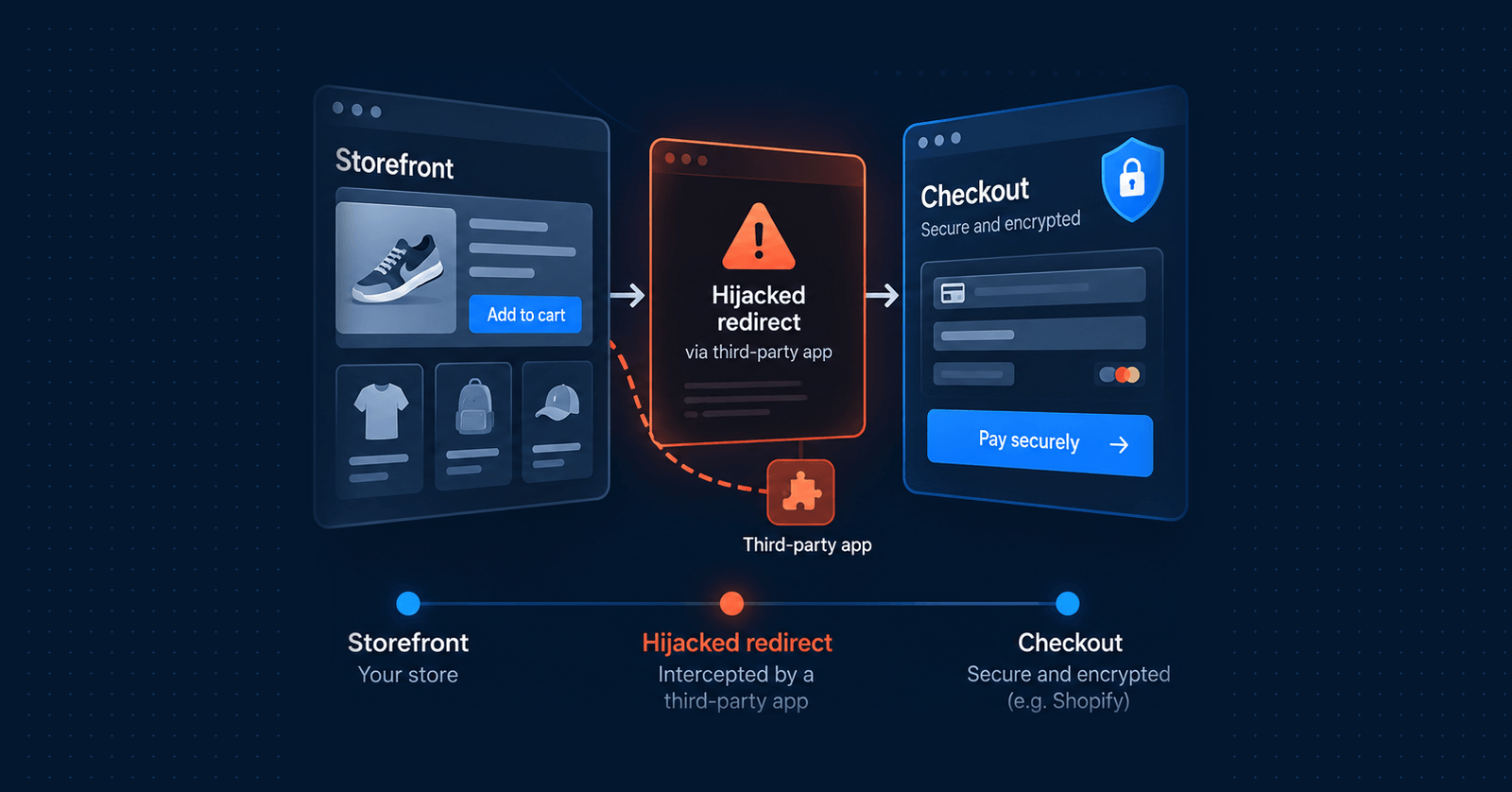
Because an attacker doesn’t necessarily need to break into the checkout to steal someone’s card information. Instead, they can interfere with what happens before the customer gets there.
- The customer clicks CheckoutThey expect to continue to Shopify’s secure payment page. Ordinarily, that’s exactly what happens.
- Malicious storefront JavaScript intercepts the clickIt prevents the normal navigation and sends the customer somewhere else.
- A fake checkout appearsIt looks almost identical to the real one, and may show the correct products, quantities, prices and delivery details.
- The customer enters their payment detailsBelieving they are completing a legitimate purchase. The attacker captures them.
- The customer is sent on to the real checkoutIn some of the recent incidents this happened afterwards, further disguising what had happened.
Shopify’s checkout hadn’t necessarily been compromised at all. The customer had been diverted before reaching it.
Isn’t Shopify PCI compliant?
Yes. Shopify is a PCI DSS Level 1 compliant service provider.
PCI DSS stands for the Payment Card Industry Data Security Standard. It’s the security standard established by the payment card industry to protect payment account information.
To understand its purpose, consider how online payments used to work. A retailer might build its own checkout, collect customers’ card numbers, transmit them to a payment processor and potentially store payment information within its own systems. Every system involved in handling that sensitive information introduced another security risk. If the retailer’s website or infrastructure was compromised, customers’ payment details could be exposed.
Modern hosted payment platforms change this arrangement. Instead of having every individual merchant design, build and secure its own payment processing systems, a specialist provider handles those sensitive operations. Shopify Checkout is an example of this approach.
Shopify takes responsibility for the security of the payment information it stores, processes or transmits on behalf of merchants, within the services it provides. That significantly reduces the amount of payment infrastructure an individual retailer needs to manage.
So why does PCI focus so heavily on checkout?
Because PCI DSS is fundamentally concerned with protecting payment account data. Its requirements are determined by where that data is stored, processed or transmitted, together with systems that can affect its security.
The checkout is an obvious area of attention because that’s where the customer supplies their payment information. If a retailer completely outsources payment collection to a compliant provider, many of the requirements involved in operating a payment infrastructure no longer apply directly to the retailer’s own systems.
However, this doesn’t mean the retailer’s storefront is irrelevant to PCI DSS. For example, PCI DSS 4.0.1 includes protections addressing payment-page scripts and unauthorised changes. The exact requirements differ between a payment form embedded within a merchant’s website and a customer being redirected to a separately hosted payment page.
The PCI Security Standards Council confirmed that merchants completing SAQ A, a common compliance questionnaire for businesses outsourcing payment processing, can still have external vulnerability-scanning obligations for their ecommerce websites, including those that redirect customers to a payment provider.
The underlying reason is straightforward: a compromised storefront can potentially redirect customers away from the legitimate payment process. PCI DSS recognises this risk, but the controls that apply depend on the merchant’s payment architecture and compliance arrangements.
Who holds the risk?
This is where compliance and broader commercial responsibility must be distinguished.
Shopify
Responsible for securing the services and payment infrastructure it provides.
The app developer
Responsible for the security of its application and the systems it operates.
The retailer
Responsible for operating its business, managing customer relationships and taking appropriate precautions when choosing third-party services.
What the customer sees: they visited a retailer they trusted and had their payment information stolen while attempting to make a purchase. They may never have heard of the app provider involved.
If an attack causes customers to lose money or exposes their personal information, responsibility and potential financial liability will depend on the circumstances, applicable law, contracts and payment network rules. It cannot automatically be assigned to one party.
And regardless of who was technically responsible for the vulnerability, the retailer may face customer complaints, reputational damage, interrupted sales and the costs of investigating the incident.
PCI compliance is an important security baseline. It isn’t a guarantee that every part of the customer journey is safe.
We now understand that Shopify apps are often developed and managed independently. But there’s another layer to consider.
The developers building those apps rarely write every line of their software from scratch. Like almost every modern software company, they use third-party components and libraries. These might provide interfaces, handle data, display images, communicate with external systems or perform any number of routine programming tasks.
Using established libraries is normal, and often improves security and reliability. But it also introduces dependencies.
Imagine a trustworthy app developer using a widely adopted JavaScript library to display an interactive component. If that library contains a security vulnerability, the app may inherit that vulnerability.
Alternatively, if attackers compromise the account or distribution system used to publish the library, they may be able to introduce malicious code into an otherwise legitimate software update. That potentially exposes every application using the affected version. This is one form of a software supply-chain attack.
The retailer trusts the app developer. The app developer trusts the library maintainer. The library may depend on further packages or services. Each relationship introduces another potential point of failure.
The danger isn’t limited to code downloaded from external websites. A vulnerable library can be bundled into the app’s own JavaScript and delivered through an otherwise trusted source.
It’s important to distinguish this general risk from the recent Shopify incidents: there is not currently sufficient public evidence to conclude that compromised open-source libraries caused those particular checkout hijackings. The documented attacks instead highlight another closely related weakness: trusting data and configuration delivered by an application’s own systems.
When harmless information becomes dangerous code
A Shopify app will frequently retrieve information from its developer’s servers.
Consider a wishlist application. The app needs to know what text to display on a button. Perhaps the retailer wants it to say “Add to Wishlist”, or something more personalised. That text might be stored in a database and retrieved whenever a visitor loads the page.
It’s easy to think of this information as harmless. After all, it’s just text. But what happens if the information returned isn’t ordinary text? What if someone manages to replace the button label with instructions that a browser can execute?
Handled as text
The odd characters are shown on the button. Ugly, but nothing runs.
Inserted as HTML
The browser treats the label as markup, the event handler fires, and the attacker’s code is now running on the storefront.
Web browsers treat ordinary text, HTML and JavaScript differently. A securely developed application must preserve those distinctions. If a field is intended to contain ordinary words, those words should be displayed as text, not interpreted as HTML or executable code.
Developers achieve this through measures including:
Sanitisation means removing or neutralising content that isn’t safe for the intended purpose. For example, a product review might legitimately contain punctuation and special characters. It shouldn’t be able to inject JavaScript that changes the operation of the website.
This applies not only to information entered by shoppers, but also to merchant settings, product information, API responses and configuration data originating from other systems.
Treat data as data, even when it comes from a system you trust.
If an application fails to enforce this boundary, an attacker may be able to inject code that executes inside a visitor’s browser. This is known as cross-site scripting, or XSS.
Despite the name, an XSS vulnerability doesn’t necessarily involve sending a customer to another website. It refers to the execution of unintended scripts within the context of a legitimate website. And because those scripts execute on the storefront, they may be able to interact with buttons, inspect visible shopping basket information or modify how the page behaves.
That brings us directly to the recent Shopify incidents.
What happened in the 2026 Shopify checkout hijacking attacks?
During 2026, several independent Shopify app providers were associated with incidents in which shoppers could be redirected to fraudulent checkout pages. The cases share a common pattern, but the publicly documented methods of compromise aren’t identical.
-
July2026
Qikify
Sticky Add to Cart; Mega Menu & Navigation
Qikify reported malicious checkout redirection affecting both applications. Customers interacting with affected add-to-cart or checkout controls could be redirected to a fraudulent website.
The provider reported identifying and removing the malicious scripts on 22 July.
-
11 Sep2026
Orichi
OC Quantity Breaks & Limit
Especially revealing, because the developer published a detailed technical explanation.
Unauthenticated internal endpoint returned privileged tokens+ Admin tool weakness allowed store impersonation→ Campaign created with malicious JavaScript→ Storefront extension served itThe app had a legitimate feature allowing custom JavaScript to be associated with campaigns, and its storefront extension distributed the malicious configuration to customers’ browsers. In other words, the app was delivering the information it had been instructed to deliver, but attackers had manipulated those instructions.
The injected script watched for checkout interactions, obtained shopping basket information and redirected visitors to a counterfeit payment page.
4,182times the script was served1,937storefront sessionsThese figures represent potential exposure, not a confirmed number of victims who submitted payment details.
-
10 Oct2026
Hulk Product Options
HulkApps
Developer Roman Zipp discovered a suspicious checkout while shopping on MechanicalKeyboards.com. After investigating the storefront’s JavaScript, he traced the redirect behaviour to the Hulk Product Options application.
App JavaScript from Shopify’s CDN→ Fetches config from HulkApps’ API→ Custom JavaScript field held ~22.7 KB of malicious codeThe code was designed to intercept checkout navigation. Zipp demonstrated that the fake checkout collected submitted information before sending the shopper to the genuine Shopify checkout.
HulkApps subsequently acknowledged that unauthorised configurations had altered its theme extension, and reported working with Shopify to remove the malicious behaviour. The investigation established how the code reached the storefront, but didn’t conclusively identify how the attackers originally obtained the ability to modify the configuration.
-
13 Oct2026
Selleasy
Logbase
Logbase reported a deliberate cyberattack affecting its Selleasy application. The company confirmed that an unauthorised script had been injected into some merchants’ storefronts, redirecting customers to an external phishing page.
In its 16 October update, Logbase stated that it had addressed the root cause and had not found evidence of a breach or data leak from its backend database. The full technical entry point had not been publicly detailed.
-
Oct2026
Swym Wishlist Plus
Swym
Particularly relevant to treating data as data. Developer Dan Sutherland reported identifying malicious content returned by Swym’s configuration API.
Config API→ Payload in the “Add to Wishlist” label setting→ Inserted as HTML, event handler executes→ Cached in local storageInstead of being handled as ordinary text, the value was inserted into the page in a manner that allowed an embedded browser event handler to execute. This is an example of stored cross-site scripting. Once active, the malicious code could intercept checkout-related interactions and redirect customers to a counterfeit checkout.
The investigation also found that Swym cached configuration information in the browser’s local storage, meaning malicious data could persist between page loads.
These findings came from an independent technical investigation. The original method used to modify the configuration, and the complete incident scope, had not been publicly established in the material reviewed.
Were the Shopify apps themselves malicious?
There is an important difference between malicious software and legitimate software that has been compromised or exploited.
Nothing in the published investigations establishes that the named app providers deliberately developed their applications to steal payment information. In several cases, the providers themselves confirmed unauthorised activity and published details of their remediation efforts.
The incidents demonstrate that a legitimate application can become an attack mechanism without the developer intending it to behave maliciously.
Sometimes the weakness is an exposed administration interface. Sometimes it’s insufficient control over executable configuration. Sometimes it’s a failure to safely handle information returned by an API. And in other circumstances, the weakness could originate from a third-party software dependency.
The common theme is misplaced trust between systems.
What can online retailers do?
The most obvious precaution is to review the applications installed on a Shopify store. Each app represents a relationship with another software provider, and potentially introduces additional code, services and permissions.
However, reviewing installed apps is only part of the answer. Even a legitimate, regularly maintained app can be compromised after installation. And because its configuration or dependencies may change remotely, a store’s behaviour can change without anyone editing the theme.
This is why ongoing monitoring matters.
Retailers
- Understand what each app does, whether it is still needed and what access it requires.
- Verify not just whether the storefront loads, but whether customers can safely complete the journey from selecting a product through to the expected checkout.
- Keep watching after installation, because an app’s behaviour can change remotely.
Useful warning signs
Developers
- Maintain secure administration systems.
- Carefully manage software dependencies.
- Ensure externally supplied information cannot unexpectedly become executable code.
Additional protection, where appropriate
No single measure removes every risk.
The lesson: security doesn’t start at checkout
Shopify’s managed checkout provides an important layer of protection for online payments. But protecting payment information inside that environment is only part of protecting a customer.
Before reaching checkout, the shopper may interact with a wide range of software supplied by independent companies, each with its own infrastructure, dependencies and potential vulnerabilities. The recent incidents show how attackers can exploit those relationships to redirect customers away from the environment designed to protect them.
The lesson isn’t that Shopify apps are inherently unsafe, or that merchants should avoid third-party software. It’s that every integration introduces another element of trust, and that trust needs to be supported by good security practices, responsible development and ongoing monitoring.
How can you detect similar attacks on your own website?
One of the most troubling aspects of these attacks is that a retailer might have no obvious indication that anything is wrong.
Every check a retailer would usually glance at can pass while customers are being diverted.
Their website remains online. Products can still be added to the basket. The genuine Shopify checkout continues to operate normally.
And because malicious code may be delivered dynamically through an app’s configuration API, simply checking that the website’s JavaScript files haven’t changed may not reveal the problem.
Two complementary forms of monitoring can help identify suspicious behaviour before it goes unnoticed for long periods.
RapidSpike Synthetics
Synthetic monitoring: testing the journey your customers actually take
Synthetic monitoring uses automated browsers to behave like real customers, repeatedly testing important activities on your website.
For example, RapidSpike Synthetics can simulate a shopper visiting your store, selecting a product, adding it to their basket and proceeding towards checkout.
- ✓Visit store
- ✓Select product
- ✓Add to basket
- ✓Proceed to checkout
Illustration: the final step checks where the customer ends up, not just that a page opened.
Crucially, the test can be configured to verify that the customer reaches the expected checkout destination, rather than simply checking whether clicking the button opens another page.
If an app hijacks the checkout button and sends the browser to an unfamiliar payment website, a correctly configured synthetic journey can detect the unexpected destination and trigger an alert.
Synthetic monitoring can also provide screenshots, recordings and information about network requests, helping technical teams investigate what happened.
This makes it valuable for detecting both security-related issues and more conventional problems, such as broken baskets, failed payment journeys and malfunctioning third-party apps.
CartShark
Monitoring the scripts and services running on your store
While synthetic monitoring tests selected journeys at regular intervals, CartShark focuses on the security of the JavaScript and third-party services operating on your website.
CartShark helps retailers understand which scripts are running, where they originate and whether potentially suspicious activity is occurring.
- Theme scriptsYour storeKnown
- App script fileShopify CDN, unchangedKnown
- App configuration responseApp developer’s APIChanged
- Request to an unexpected destinationUnfamiliar external domainSuspicious
Illustration: the script file looks fine; what it does in the browser does not.
Using lightweight monitoring during real customer sessions, it can identify changes in third-party resources, unexpected external destinations and behaviour associated with web-skimming attacks.
This is particularly relevant to the recent Shopify incidents. A legitimate app might continue to load its normal JavaScript file, but subsequently receive malicious instructions from its developer’s compromised configuration service.
Monitoring only the original script file might therefore miss the attack. Monitoring the resources and behaviour observed in customers’ browsers provides another opportunity to identify suspicious activity.
CartShark also offers automated browser-based checkout simulations through its ScriptSentinel monitors, complementing its real-user security monitoring.
Why use both approaches?
Synthetic monitoring and client-side security monitoring address different aspects of the same problem.
Neither approach can guarantee detection of every attack. Some malicious scripts activate only for particular visitors, locations or circumstances, making appropriate coverage and alert configuration important.
See what happens before your customers reach checkout
Both provide something that simply relying on Shopify’s secure checkout cannot: visibility into what is happening before the customer gets there.